Kubernetes is no longer an experimental platform. CNCF’s 2025 Annual Cloud Native Survey found that 82% of container users run Kubernetes in production, up from 66% in 2023. At the same time, 77% of organizations surveyed in earlier CNCF research reported adopting GitOps principles for deployment.
Yet many Kubernetes environments still depend on engineers manually updating manifests, running kubectl apply, or giving CI pipelines broad production access. That works—until configuration drifts, a rollback is needed, or nobody can explain exactly what changed.
GitOps is an operating model where Git stores the desired state of applications and infrastructure, while a controller such as ArgoCD continuously compares that desired state with the live Kubernetes cluster and reconciles differences. In production, this gives teams version-controlled deployments, drift detection, rollback capability, and a verifiable audit trail.
This guide explains how GitOps works in production using lessons from an actual Kubernetes deployment workflow built around Azure DevOps, container images, Kubernetes manifests, and ArgoCD.
Why GitOps Matters in Production Kubernetes
The biggest Kubernetes deployment problem is often not creating a Deployment or Service.
It is answering three questions reliably:
- What should be running?
- What is actually running?
- Who changed it?
Without a controlled workflow, an engineer might run:
kubectl set image deployment/payment-api payment-api=registry/payment-api:v2
Production changes immediately, but the manifest in Git may still reference v1.
Now Git and production disagree.
This is configuration drift.
With Kubernetes configuration drift and self-healing, Git becomes the authoritative desired state. ArgoCD continually compares Git with the live cluster and identifies or corrects differences according to the configured synchronization policy.
That distinction becomes increasingly important as organizations manage more services, clusters, and environments.
How a Production GitOps Workflow Actually Works
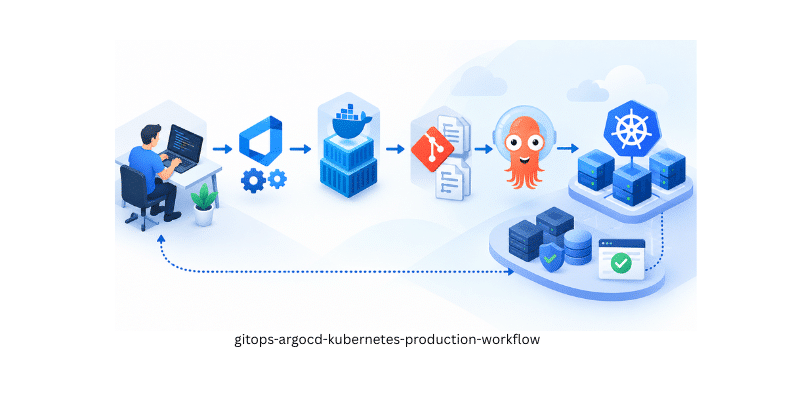
A practical GitOps workflow with ArgoCD and Kubernetes can be represented as:
Developer Commit → CI Build → Container Registry → Manifest Update → Git → ArgoCD → Kubernetes → Verification
Each component has a separate responsibility.
CI Builds the Application and Container Image
In one production workflow we manage, Azure DevOps is responsible for building the application and creating the Docker image.
The pipeline:
- builds the application,
- creates the container image,
- assigns an Azure DevOps Build ID as the image tag,
- authenticates with Azure Container Registry,
- pushes the image to the registry.
In one of our production Kubernetes workflows, Azure DevOps uses the pipeline Build ID as the container image tag before building and pushing the image to the registry. This makes every deployed image traceable to a specific CI execution.
Instead of:
payment-api:latest
a deployment can reference something traceable:
payment-api:18452
That small design decision improves rollback, auditing, and incident investigation because a running container can be mapped back to a specific pipeline execution.
Git Stores the Desired Kubernetes State
Building an image does not automatically mean production should run it.
The next step is updating the Kubernetes configuration.
In our production workflow, the deployment pipeline updates the Kubernetes manifest with the newly generated container tag before publishing the deployment artifacts. This keeps the application build and the Kubernetes deployment state aligned.
We maintain separate Kubernetes deployment manifests for pre-production and production, reducing the risk of environment-specific configuration being applied to the wrong cluster.
This is important for a reliable Kubernetes GitOps deployment because environment differences become explicit instead of depending on someone’s memory.
A typical repository may look like:
manifests/
├── deploy-pre-prod.yaml
└── deploy-live.yaml
Git can then answer:
- Which image is deployed?
- What changed?
- Who changed it?
- When was it changed?
- What was the previous configuration?
That is where Git becomes an operational record rather than simply a source-code repository.
How GitOps with ArgoCD Changes Deployment
Traditional pipelines generally use a push model.
The CI/CD system receives Kubernetes credentials and executes deployment commands against the cluster.
GitOps with ArgoCD changes that model.
ArgoCD watches the Git repository and compares:
Desired state: manifests stored in Git
Actual state: Kubernetes resources currently running
If they differ, ArgoCD marks the application as out of sync.
Depending on your policy, you can then:
- manually approve synchronization,
- automatically synchronize changes,
- enable self-healing,
- prune resources removed from Git.
The important difference is continuous reconciliation.
A traditional deployment says:
Apply this configuration.
GitOps continually asks:
Does production still match the approved configuration?
GitOps vs Traditional CI/CD vs Manual Deployment
| Capability | Manual Kubernetes | Traditional CI/CD | GitOps continuous deployment |
| Deployment source | Engineer | Pipeline | Git |
| Cluster credentials | Engineer workstation | CI platform | In-cluster controller |
| Desired state recorded | Sometimes | Usually | Yes |
| Drift detection | Manual | Limited | Continuous |
| Self-healing | No | Usually no | Supported |
| Rollback | Manual | Pipeline-dependent | Git-based |
| Audit trail | Limited | Moderate | Strong |
| Reconciliation | None | One-time | Continuous |
GitOps does not replace CI.
CI answers:
“Can we build and test this software?”
GitOps answers:
“What should production run, and does production still match it?”
What Production Experience Teaches You About GitOps
The biggest lesson from operating this model is that automation does not replace operational discipline.
Back Up and Establish Rollback Before Changes
In our production change process, backup and rollback readiness are validated before major deployments, followed by application health, integration, and business-critical checks after the change.
Git history provides configuration rollback, but databases, persistent storage, and external dependencies may require separate recovery plans.
Make Small, Reviewable Changes
Changing only the necessary manifest lines makes reviews easier and rollback safer.
Large unrelated configuration changes weaken one of GitOps’ greatest benefits: readable history.
Avoid Persistent Manual Changes
Emergency kubectl changes may occasionally be necessary.
But if a resource is managed by ArgoCD, that live modification should be reflected in Git—or intentionally reverted.
Otherwise self-healing may overwrite it.
Verify the Application, Not Just ArgoCD
Synced does not necessarily mean “the application works.”
A production verification should include:
- pod readiness,
- rollout status,
- application logs,
- health probes,
- API responses,
- database connectivity,
- integrations,
- business-critical smoke tests.
Our production deployment process also includes application health checks, integration validation, and smoke or functional testing before a release is considered successful.
A Real Production GitOps Example
Consider a microservice release in a production Kubernetes environment.
A developer commits an application change.
Azure DevOps builds the application and produces:
merchant-api:18452
The image is pushed to the container registry.
The production manifest is then updated to reference build 18452, while the pre-production manifest remains independently controlled.
ArgoCD sees the desired-state change and reconciles Kubernetes.
After the rollout, engineers validate pods, endpoints, logs, integrations, and application behavior.
If the deployment fails, the previous Git revision identifies the earlier working image and configuration.
This is the practical value of how GitOps works in production:
deployment history becomes recovery evidence.
What GitOps Does Not Solve
GitOps improves deployment control, but it does not automatically fix:
- application bugs,
- unsafe database migrations,
- poor readiness probes,
- missing monitoring,
- insecure secrets,
- incorrect manifests,
- broken third-party integrations.
GitOps can also automate a bad configuration very efficiently.
That is why pull-request reviews, policy controls, observability, testing, and rollback procedures still matter.
DORA’s 2024 research illustrates the importance of combining speed with reliability: its highest-performing software-delivery group deployed on demand, had a 5% change failure rate, and recovered from failed deployments in less than one hour.
The Future of GitOps and Kubernetes Delivery
The next stage of GitOps continuous deployment will increasingly combine reconciliation with security, governance, and platform engineering.
Key trends include:
- multi-cluster GitOps,
- policy-as-code,
- progressive delivery,
- image signing and verification,
- automated vulnerability scanning,
- secrets integration,
- automated rollback,
- GitOps-driven internal developer platforms,
- AI-assisted configuration and drift analysis.
CNCF’s 2025 survey also found that 82% of container users now run Kubernetes in production, reinforcing why scalable deployment governance is becoming a mainstream infrastructure requirement rather than a niche DevOps practice.
GitOps is also becoming a core component of the modern Internal Developer Platform, where Kubernetes, CI/CD, GitOps, observability, and developer self-service are combined into standardized workflows.
GitOps Makes Kubernetes Predictable
The real value of GitOps is not simply deploying applications faster.
It is making production explainable.
A mature workflow can trace a deployment from:
Git commit → CI build → container image → manifest change → ArgoCD sync → Kubernetes rollout → production validation
For startups, that creates good operational habits before environments become complex.
For enterprises, it provides governance, traceability, and repeatability across teams and clusters.
For DevOps and platform teams, it reduces dependence on manual commands and tribal knowledge.
Ready to Replace Manual Kubernetes Deployments with GitOps?
If your Kubernetes releases still depend on manual kubectl commands, mutable image tags, inconsistent environment manifests, or CI systems with direct production access, simply installing ArgoCD is not enough.
You need a GitOps architecture built around controlled deployment flows, environment separation, immutable images, drift management, rollback, monitoring, and production validation.
Geeks Solutions can help you assess your current Kubernetes deployment process and design a production-ready GitOps architecture using ArgoCD, Azure DevOps, GitHub Actions, Helm, Kustomize, container registries, observability, and automated deployment controls.
Organizations planning GitOps with ArgoCD, Kubernetes automation, and CI/CD modernization can work with our DevOps Consulting Services team to design a production-ready deployment architecture.
Start with a GitOps readiness review to identify manual deployment steps, configuration drift risks, rollback gaps, and automation opportunities before they become production incidents.
Frequently Asked Questions:
GitOps is a deployment and infrastructure management model where Git stores the desired state of applications and infrastructure. In production, a GitOps controller such as ArgoCD continuously compares Kubernetes resources with Git and reconciles differences.
A typical GitOps workflow with ArgoCD and Kubernetes follows this process:
Code change → CI build → container image → Git manifest update → ArgoCD reconciliation → Kubernetes deployment → validation
This creates a traceable and repeatable deployment process without relying on manual changes inside the cluster.
GitOps with ArgoCD works by continuously comparing Kubernetes resources running in the cluster with the manifests stored in Git.
If ArgoCD detects a difference between the desired configuration in Git and the actual cluster state, it marks the application as out of sync. Depending on the configured policy, ArgoCD can then synchronize the cluster automatically or wait for manual approval.
This continuous reconciliation helps maintain consistent Kubernetes environments.
The main difference between GitOps and traditional CI/CD is how deployments reach Kubernetes.
Traditional CI/CD pipelines commonly push changes directly to the cluster using Kubernetes credentials.
With GitOps continuous deployment, CI builds and tests the application, while Git stores the desired deployment state and a controller such as ArgoCD handles reconciliation.
In simple terms:
CI/CD builds the application. GitOps controls what should run in production.
Kubernetes configuration drift and self-healing work by continuously comparing the live cluster against the configuration stored in Git.
For example, if an engineer manually changes a Kubernetes Deployment using kubectl edit, the running configuration may no longer match Git.
ArgoCD can detect this difference and, when self-healing is enabled, automatically restore the Git-defined configuration.
This makes configuration drift visible and prevents undocumented changes from remaining permanently in production.
The main benefits of Kubernetes GitOps deployment include:
Version-controlled infrastructure changes
Clear deployment history
Easier rollback using Git
Continuous configuration drift detection
Improved auditability
Consistent staging and production environments
Reduced dependency on manual kubectl commands
Better separation between CI and deployment operations
For production DevOps teams, the biggest advantage is that every deployment can be traced from a Git change to the container image and the resulting Kubernetes state.